Booking System for University Fabrication Labs
Full-Stack Development & UI Design
My Role
Developer & Designer
Equipment booking system for university fabrication facilities with role-based scheduling and capacity management.
Tech Stack
Frontend:
React.js
React Context (state management)
React Router
Material-UI (MUI Date Picker)
CSS
Backend:
Node.js (native HTTP modules)
Vercel Serverless Functions
Database:
MongoDB
Services & Tools:
JWT Authentication
Resend API (email notifications)
Vercel (frontend)
Git & GitHub
Figma (UI/UX design)
GitHub Issues (project management)
Problem
The University of Tampa's fabrication facilities were managing equipment scheduling manually through emails, leading to a lack of transparency and data, scheduling conflicts, and limited equipment access. Working directly with facility managers, I developed a centralized scheduling platform that automates equipment reservations across two labs, manages capacity constraints, and streamlines facility operations for the Department of Art & Design's 130+ students and 20+ faculty members.
Key Features
Multi-step booking workflow with conditional logic
Real-time capacity-aware time slot generation
Role-based dashboards (Student, Faculty, Admin)
Equipment availability and maintenance scheduling
Automated email notifications
Usage tracking for operational insights
Jump To
Feature Gallery
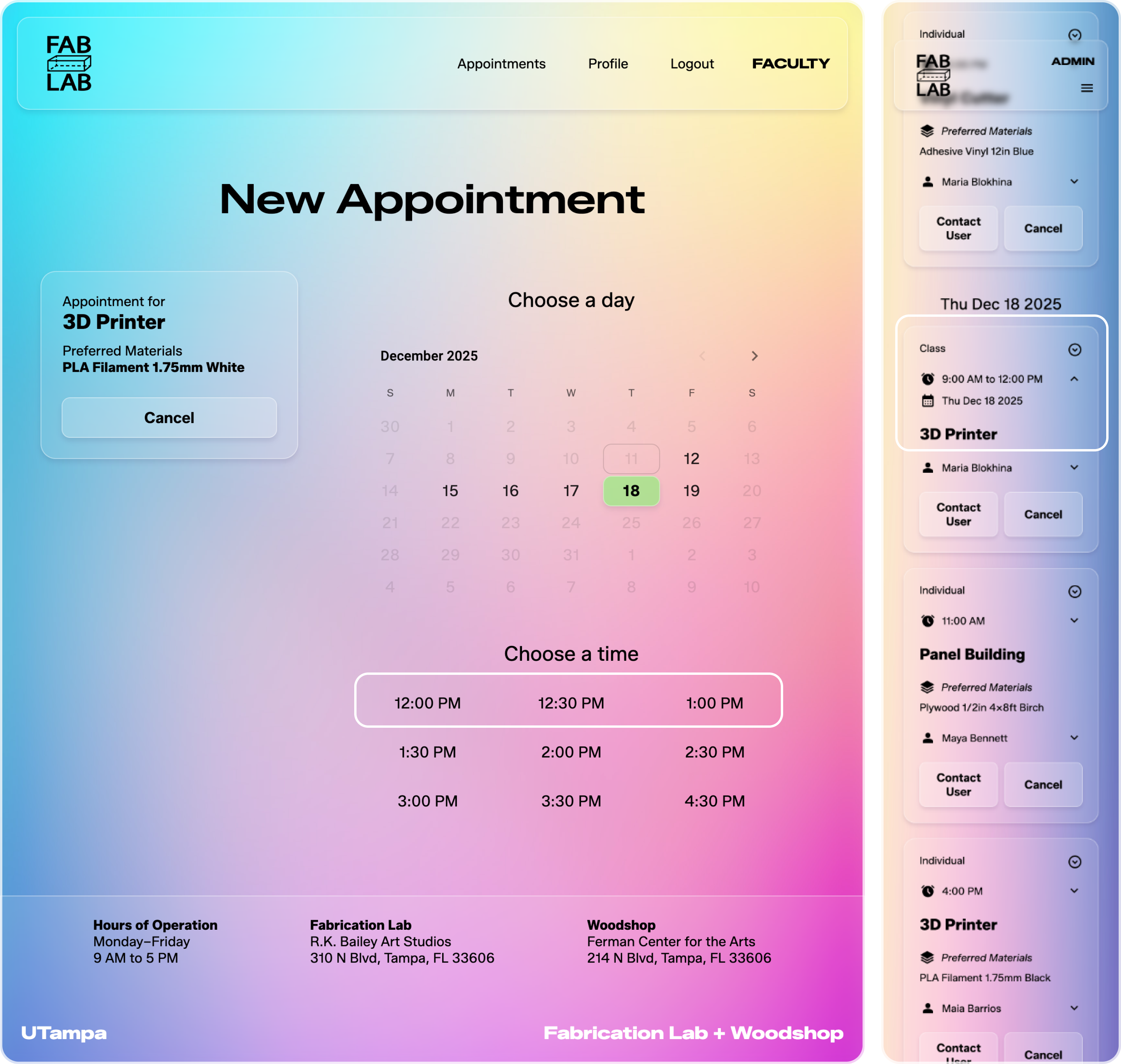
Intelligent Time Slot Generation
Intelligent Time Slot Generation
Built dynamic time slot generation that accounts for multiple scheduling constraints in real-time. The system generates 30-minute appointment slots based on facility operating hours, then filters slots by:
Existing appointments - Preventing double-booking
Class reservations - Preventing scheduling appointments if the equipment is reserved for a class
Equipment capacity - 3D printers support 7 concurrent users and if 7 users booked at the same time, the slot won't appear
University schedules - Accounting for semester dates, weekends, and holidays
Equipment maintenance - Removing slots when equipment is unavailable
The algorithm recalculates available slots each time a user selects a different date or equipment type, ensuring accurate, real-time availability.
Technical implementation:
Custom slot generation algorithm
Capacity tracking per equipment per time slot
MongoDB queries for conflict checking
Real-time validation on equipment capacity
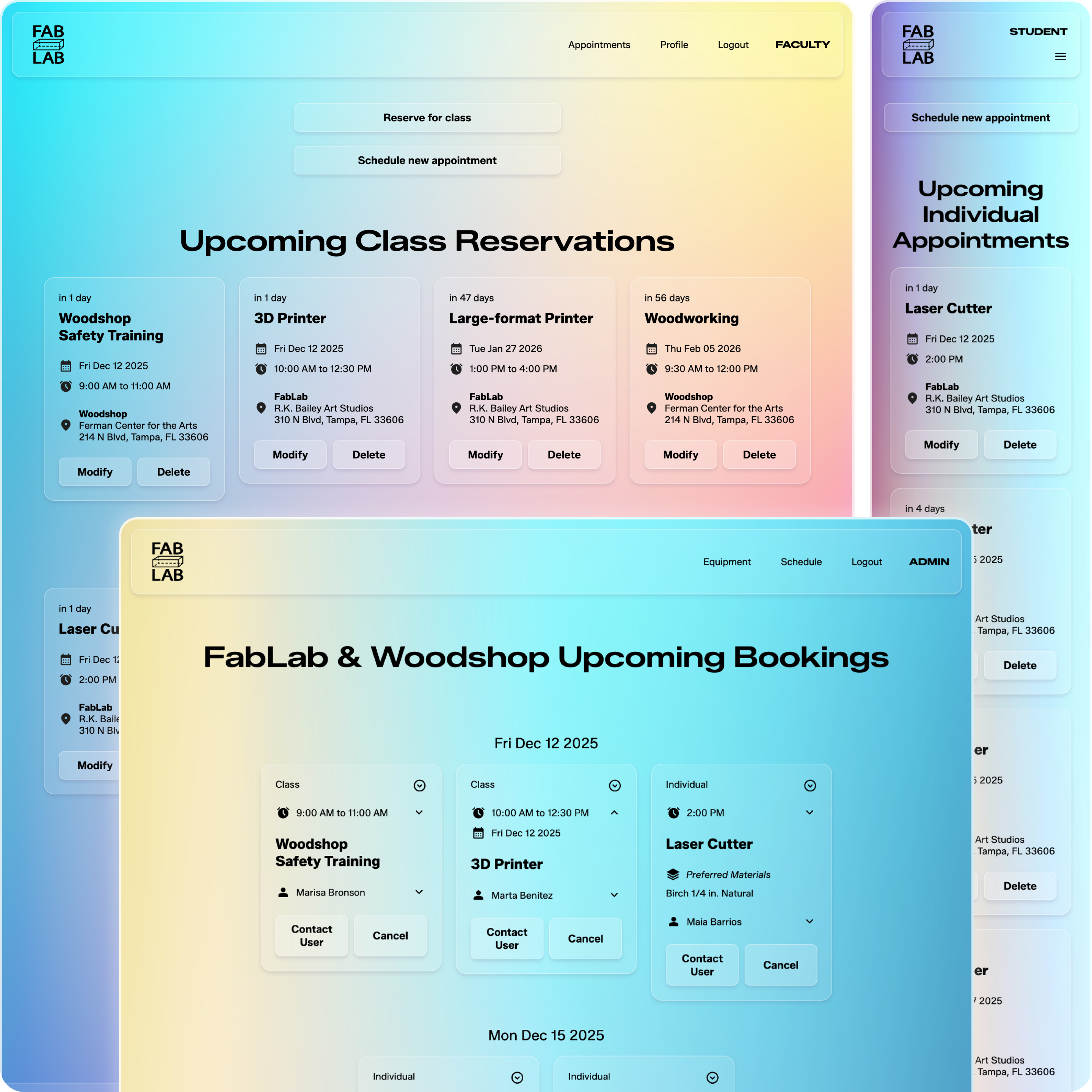
Role-Based Dashboards
Role-Based Dashboards
Designed distinct interfaces optimized for different user needs and workflows. Each role sees information most relevant to their tasks:
Student/Faculty Dashboard: Users see their upcoming appointments as scannable cards highlighting essential information: countdown to appointment ("in 3 days"), equipment type, date with day of week, time, and lab location. Cards provide quick access to modify or cancel appointments.
Admin Dashboard: Administrators view all appointments for their assigned facilities (FabLab, Woodshop, or both), with appointment cards designed to surface different information: appointment type (individual vs. class), booking time, equipment, material selections, and user name. Admins can cancel appointments with a cancellation reason that's automatically emailed to users.
Technical implementation:
Role-based routing with JWT authentication
Conditional rendering based on user role
Different data queries per role
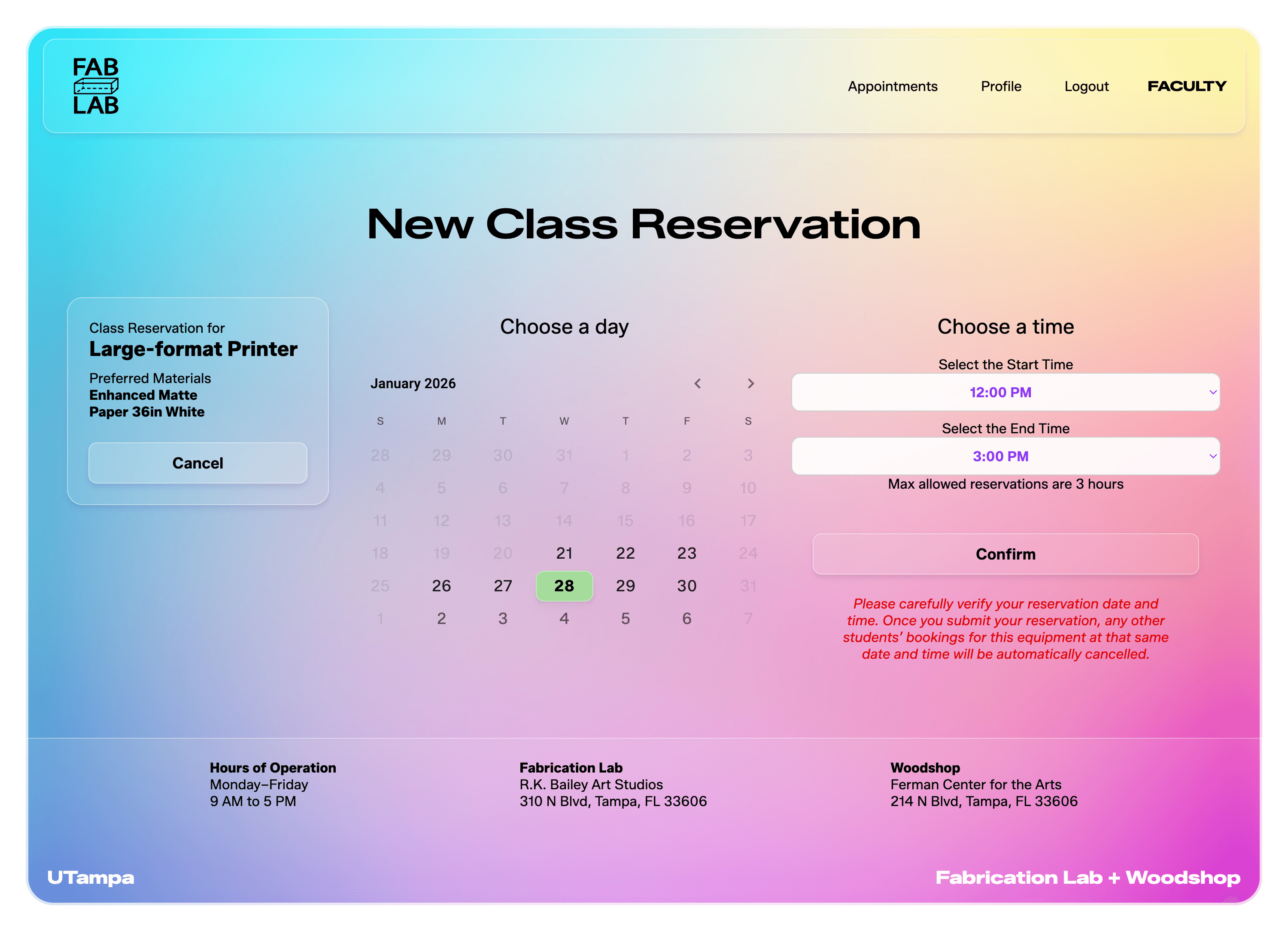
Faculty Class Reservations
Faculty Class Reservations
Implemented role-specific functionality enabling faculty to reserve equipment for entire classes, with a workflow tailored to their unique needs. Unlike individual 30-minute appointments, faculty can book equipment for up to 3 hours to accommodate full class sessions.
The class reservation system uses a time range selector rather than discrete slots, allowing faculty to specify exact start and end times.
Planned enhancement: Automated cancellation of conflicting individual appointments when a class reservation is created, with email notifications to affected students offering alternative time slots.
Technical implementation:
JWT-based role validation
Separate booking workflow for faculty role
Time range selection vs. slot selection
Database schema supporting both appointment types
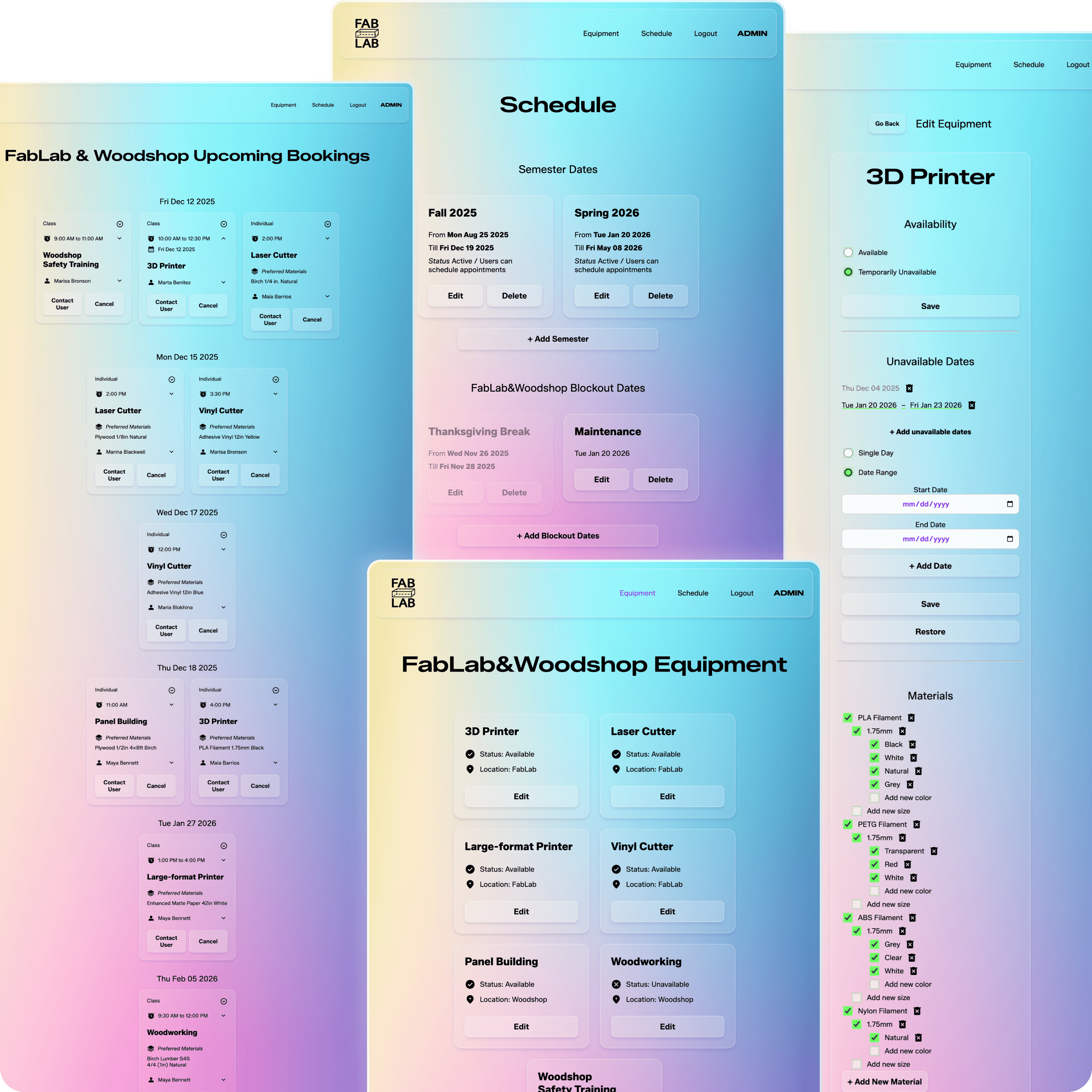
Admin Equipment & Facility Management
Admin Equipment & Facility Management
Built a comprehensive administrative control panel enabling facility managers to configure equipment availability, manage material inventory, and set facility schedules.
Equipment Management
Mark equipment temporary unavailable or unavailable for specific dates or date ranges
Track material inventory (add/remove materials for equipment requiring supplies or mark material unavailable)
Changes instantly reflect in the booking interface
Facility Scheduling
Set semester start and end dates (facilities closed outside semester)
Add holidays and campus closure dates
Blockout dates applied per facility (FabLab and Woodshop can have different schedules)
Future capability: Modify daily operating hours per facility and per day of week.
The centralized admin panel reduces manual coordination, ensuring scheduling rules are consistently.
Technical implementation
CRUD operations for equipment and scheduling data
Admin-only routes with role authentication
Automated Email Notifications
Automated Email Notifications
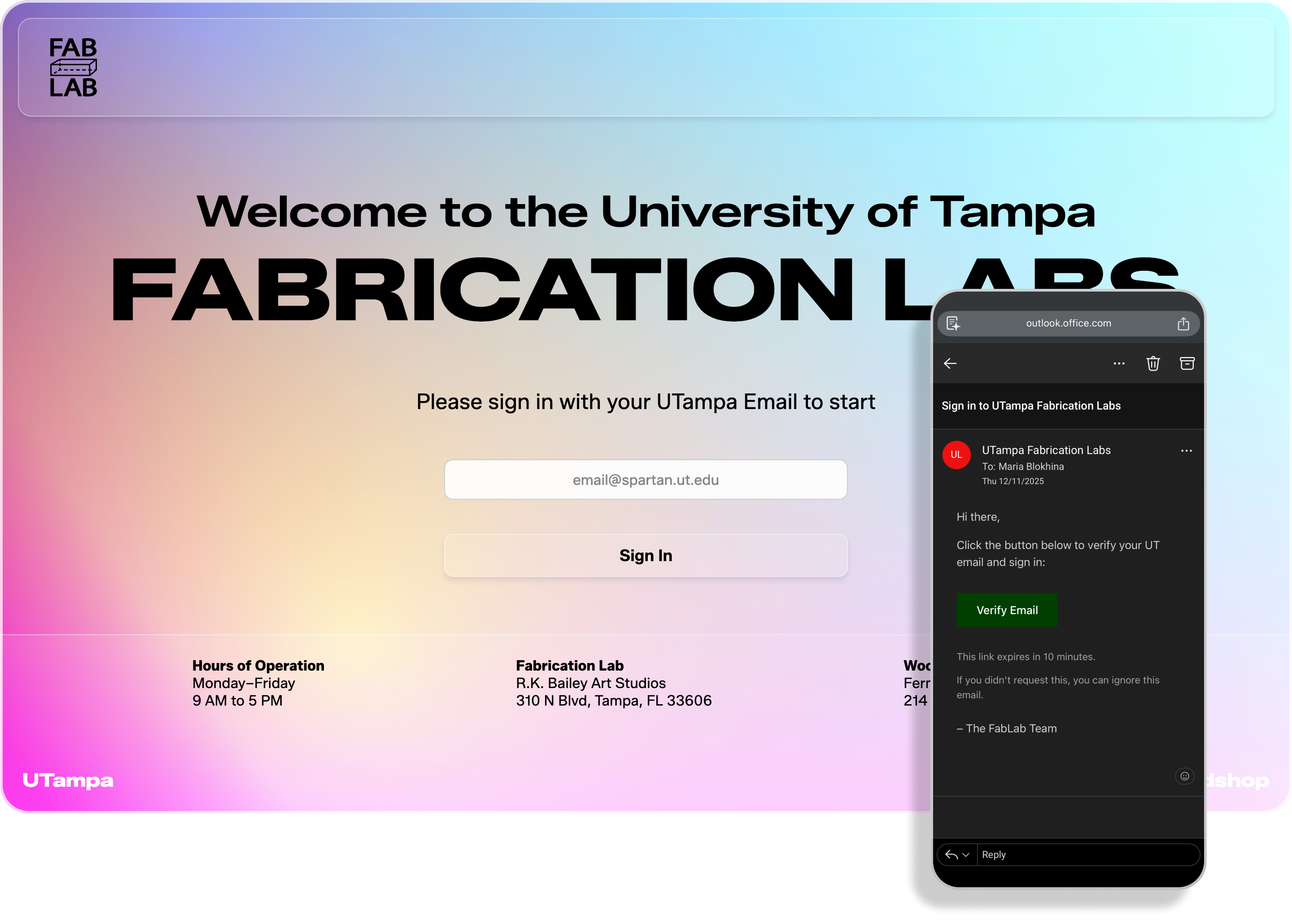
Integrated email notification system using Resend API to keep users informed throughout the booking lifecycle.
Email Verification
New users receive a verification link upon registration, ensuring account security and valid university email addresses.
Appointment Notifications
Cancellation notifications when admins cancel appointments, including admin-provided cancellation reason
Current optimization: Refining email deliverability for institutional email systems to ensure notifications reach university inboxes reliably.
Technical implementation
Resend API integration
Server-side email dispatch on booking/cancellation events
Responsive Design
Responsive Design
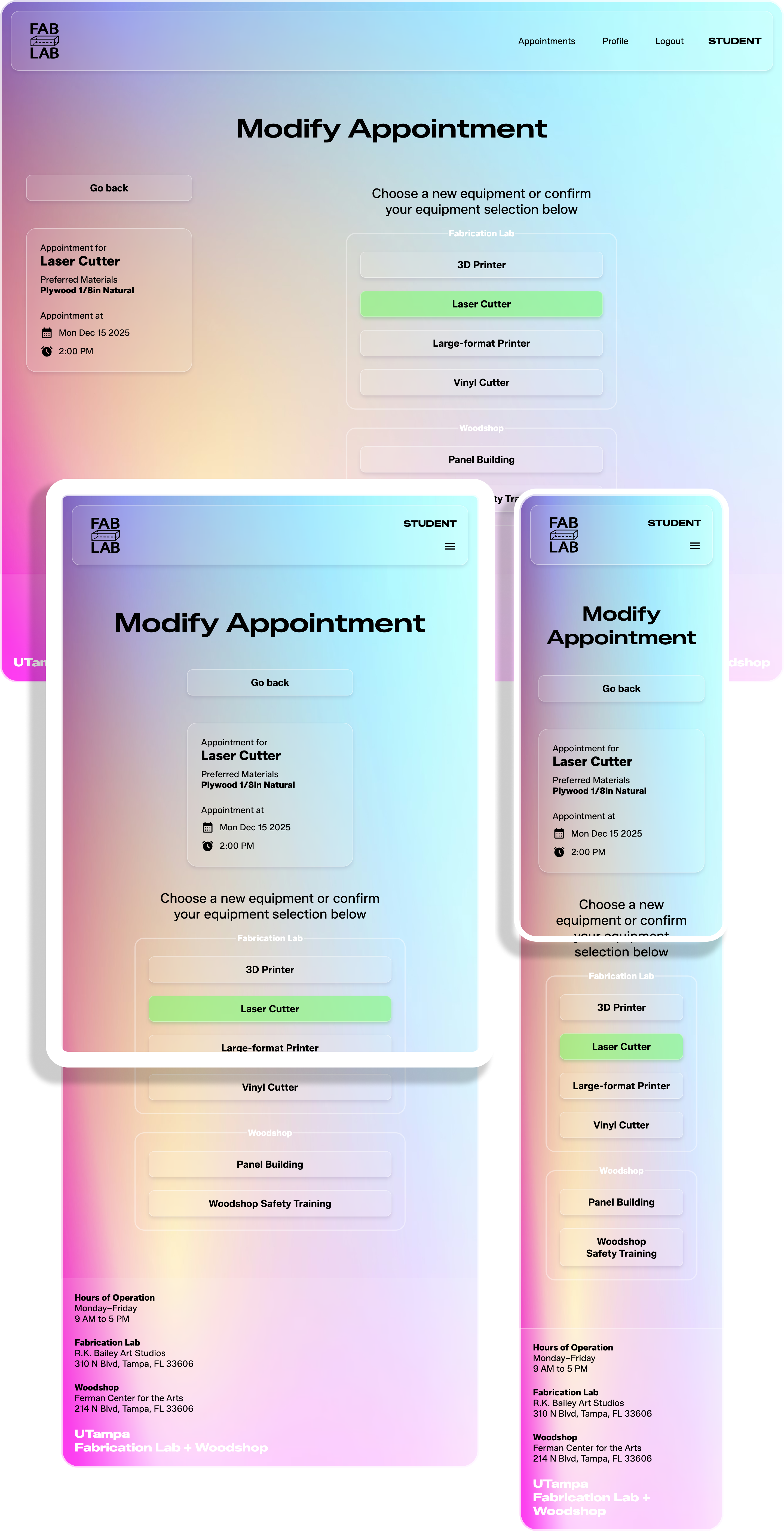
Built with a mobile-first approach, the platform adapts seamlessly across devices. The layout uses CSS Flexbox and Grid to reorganize appointment cards, navigation, and forms for optimal viewing on any screen size, ensuring students can book appointments from anywhere.
Technical Challenges & Solutions
Complex Availability Logic
Challenge: Time slot generation needed to account for multiple overlapping constraints: semester dates, facility-specific schedules, equipment maintenance windows, holidays, and existing bookings.
Solution: Designed a layered validation system that filters availability progressively. The system first checks facility-level constraints (operating hours, semester dates, holidays), then equipment-level constraints (maintenance, capacity), and finally time-slot conflicts.
Serverless Architecture Adaptation
Challenge: Built the backend with pure Node.js using native HTTP modules before learning Express.js. Needed to adapt the routing and middleware logic to work within Vercel's serverless function constraints.
Solution: Refactored route handlers into individual serverless functions while maintaining shared utility modules. Implemented custom middleware patterns compatible with Vercel's request/response model. This approach deepened understanding of Node.js fundamentals and serverless architecture patterns.
Email Deliverability for Institutional Systems
Challenge: University email systems flagged automated notifications as potential spam, preventing users from receiving verification links and appointment updates.
Solution: Implementing SPF and DKIM authentication for the sending domain to improve deliverability scores. Exploring alternative email service providers with better institutional reputation.
Future Improvements Plan
Automated Conflict Resolution: When faculty creates class reservations, automatically cancel conflicting individual appointments and notify affected students with alternative time suggestions
Usage Analytics Dashboard: Visualize equipment usage patterns, peak booking times, and facility utilization rates to inform operational decisions
Flexible Operating Hours: Enable admins to set different operating hours per day of week and per facility
Phone Notifications: Add text message reminders for upcoming appointments