Arts & Ideas Digital Calendar
Full-Stack Development & UI Design
My Role
Developer & Designer
Interactive event calendar translating a print publication's identity to a responsive digital platform with auto-updating content and custom calendar logic
Tech Stack
Frontend:
React.js
React Router
CSS
Backend:
Node.js
Express.js
Database:
Supabase (PostgreSQL)
Cloudinary (image optimization)
Services & Tools:
Vercel (frontend)
Railway (backend)
Git & GitHub
Figma (UI/UX design)
GitHub Issues (project management)
Problem
Arts & Ideas, the University of Tampa College of Arts & Letters' annual print publication, needed a digital presence to make event information more accessible throughout the academic year. Working with the publication's designer, I built a responsive web platform that preserves the publication's visual identity while adding interactive features like auto-updating upcoming events, dual calendar views (list and grid), and mobile-optimized layouts.
Before development, I worked with the publication's designer to create a Figma prototype that translated the print aesthetic to an interactive digital experience. The final product channels the visual hierarchy, typography, and layout system that maintains the publication's distinctive identity while to web-specific layout and interactions.
Key Features
Auto-updating upcoming events showcase
Custom calendar grid with dual view modes: list and calendar
Mobile-optimized responsive layouts
Real-time past event filtering
Smart month navigation skipping empty periods
Interactive day details with event popovers (for desktop) or expanded cards (for mobile)
Jump To
Feature Gallery
Auto-Updating Upcoming Events
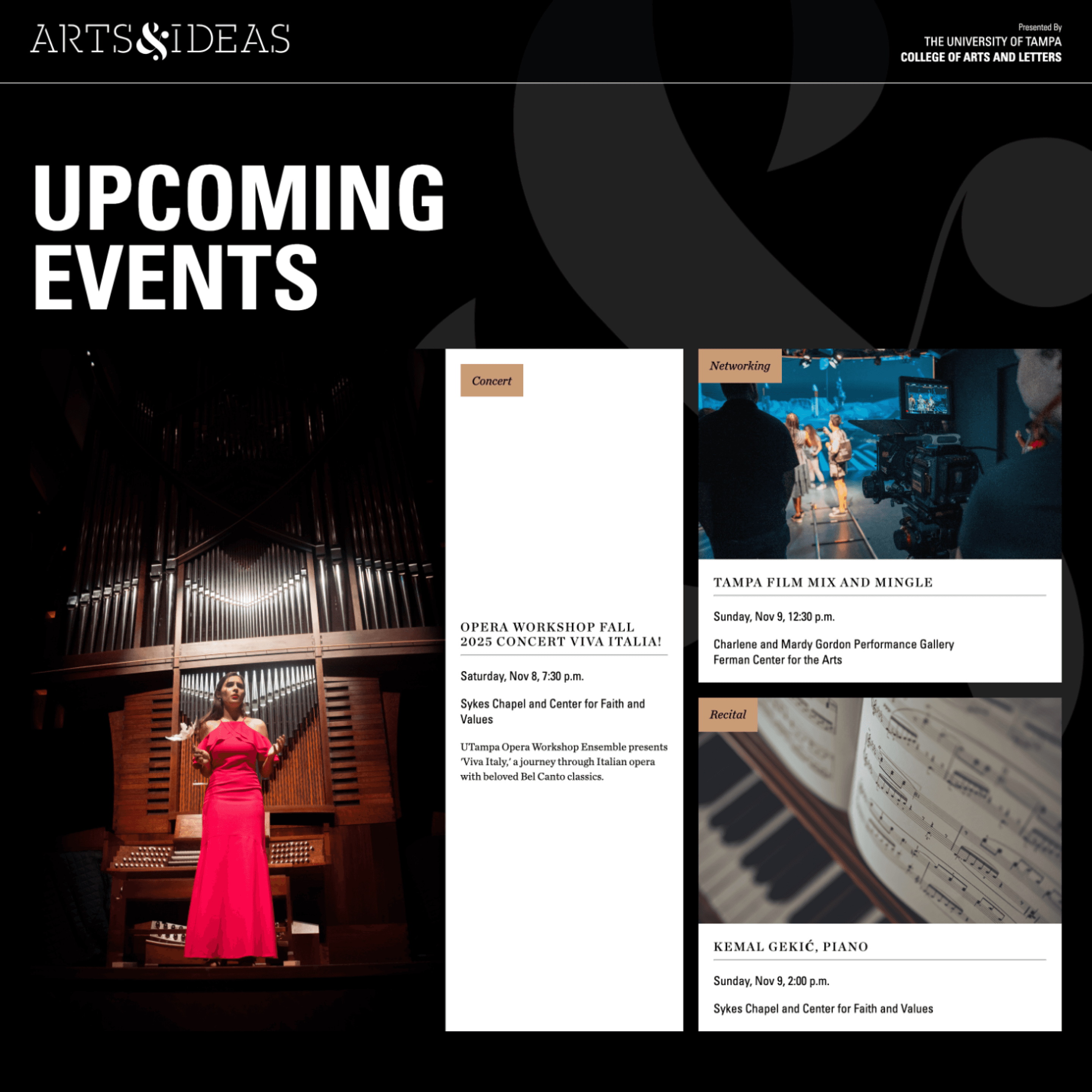
Auto-Updating Upcoming Events
Built a dynamic showcase that automatically surfaces the next three upcoming events from the database, updating in real-time as events pass. Each featured event displays a curated thematic image with complete event details, maintaining the publication's distinctive visual layout and typography.
The system queries the database for events with future dates, sorts by date, and renders the top three results
Technical implementation:
Date comparison against current timestamp
Automatic sorting and filtering of events
Cloudinary integration for optimized image delivery
Responsive image scaling maintaining aspect ratios
Custom Calendar Grid with Date Calculation
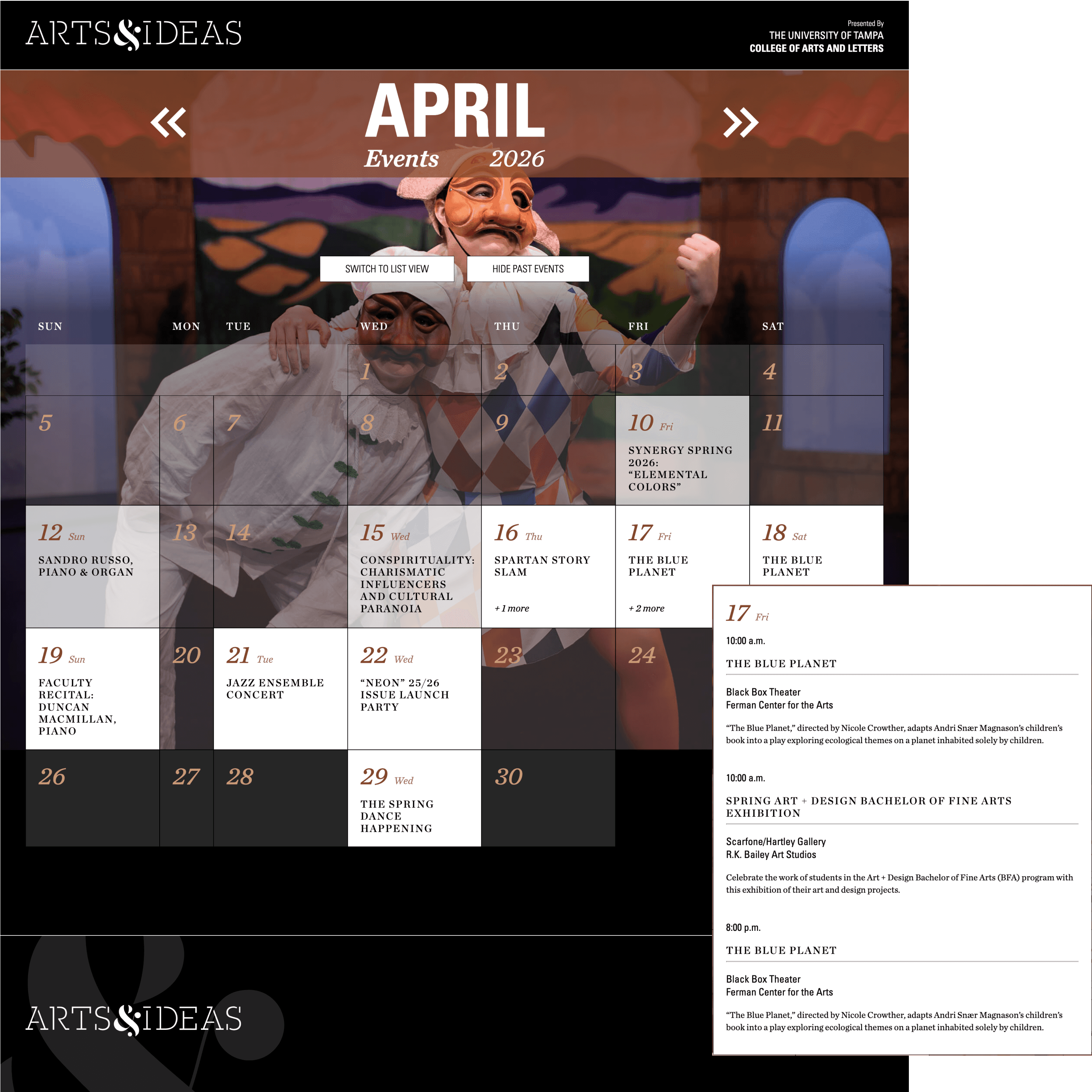
Custom Calendar Grid with Date Calculation
Designed and implemented a fully custom calendar grid using CSS Grid, with JavaScript logic that automatically calculates the starting day of each month and positions dates correctly within the seven-column layout. The system accounts for varying month lengths and leap years without relying on external calendar libraries.
Each calendar cell displays the date, day of week, and event information when applicable. Days with events show the time and title of the first event, plus a count of additional events that day (e.g., "+2 more"). Users can click any day with events to view complete details in an interactive popover.
Technical implementation:
JavaScript date calculation
CSS Grid with dynamic cell positioning
Event aggregation by date
Click handlers with popover state management
Dual View System: List & Calendar
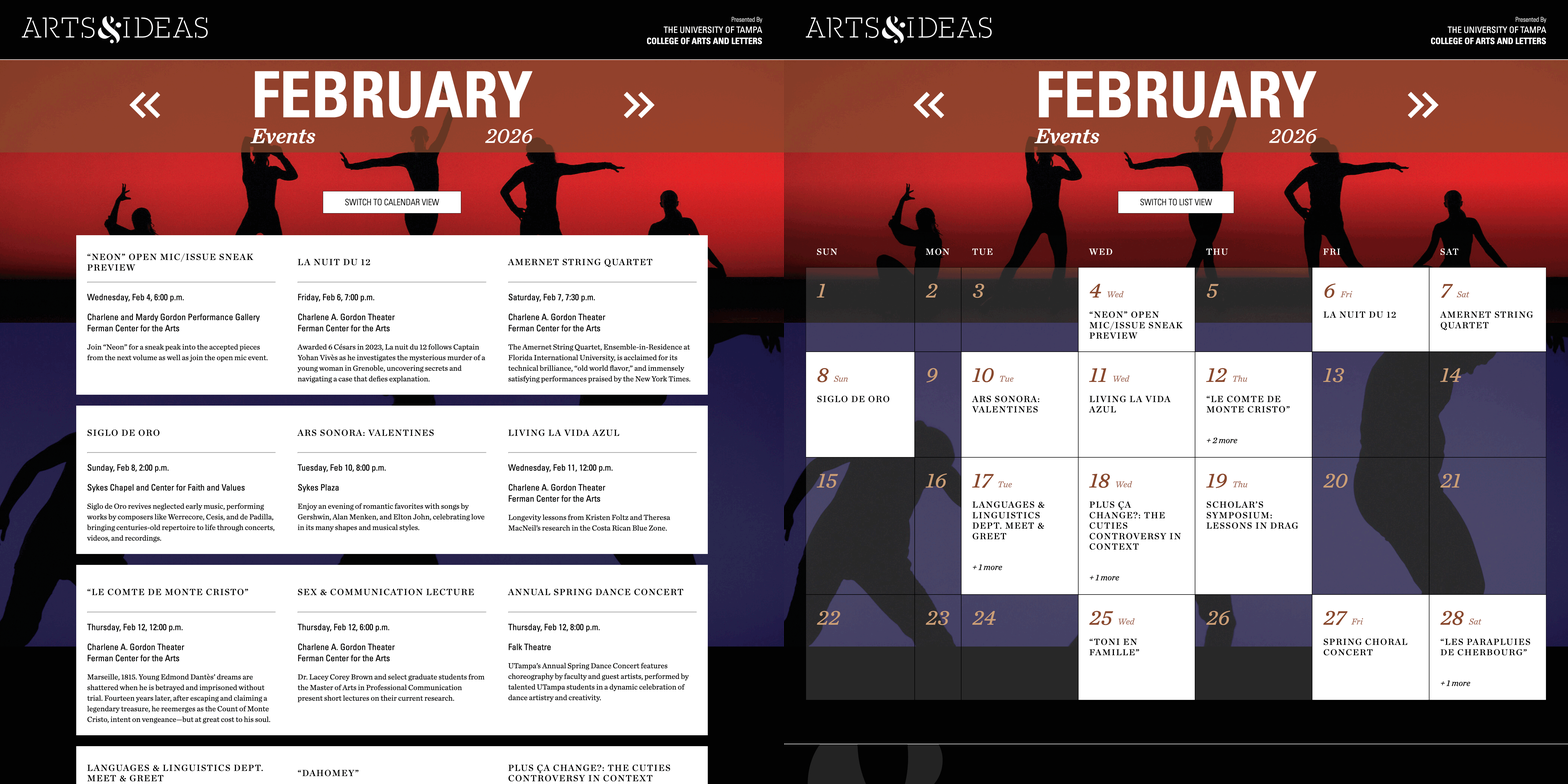
Dual View System: List & Calendar
Implemented two distinct visualization modes inspired by the publication's layout: a list view showing chronological event details and a calendar grid view for date-oriented browsing. Users can toggle between views while maintaining their current month position, with the selected view persisting across month navigation.
List View: Events displayed in publication-style cards with full details (title, date, time, location with Google Maps integration, description)
Calendar View: Month grid showing all days with event indicators, expandable day cells revealing complete event information
The dual-view approach accommodates different user needs: scanning by event vs. scanning by dates
Technical implementation:
Component state management for view switching
Persistent view state across month navigation
Different data structures optimized per view
Smart Month Navigation with Event Filtering
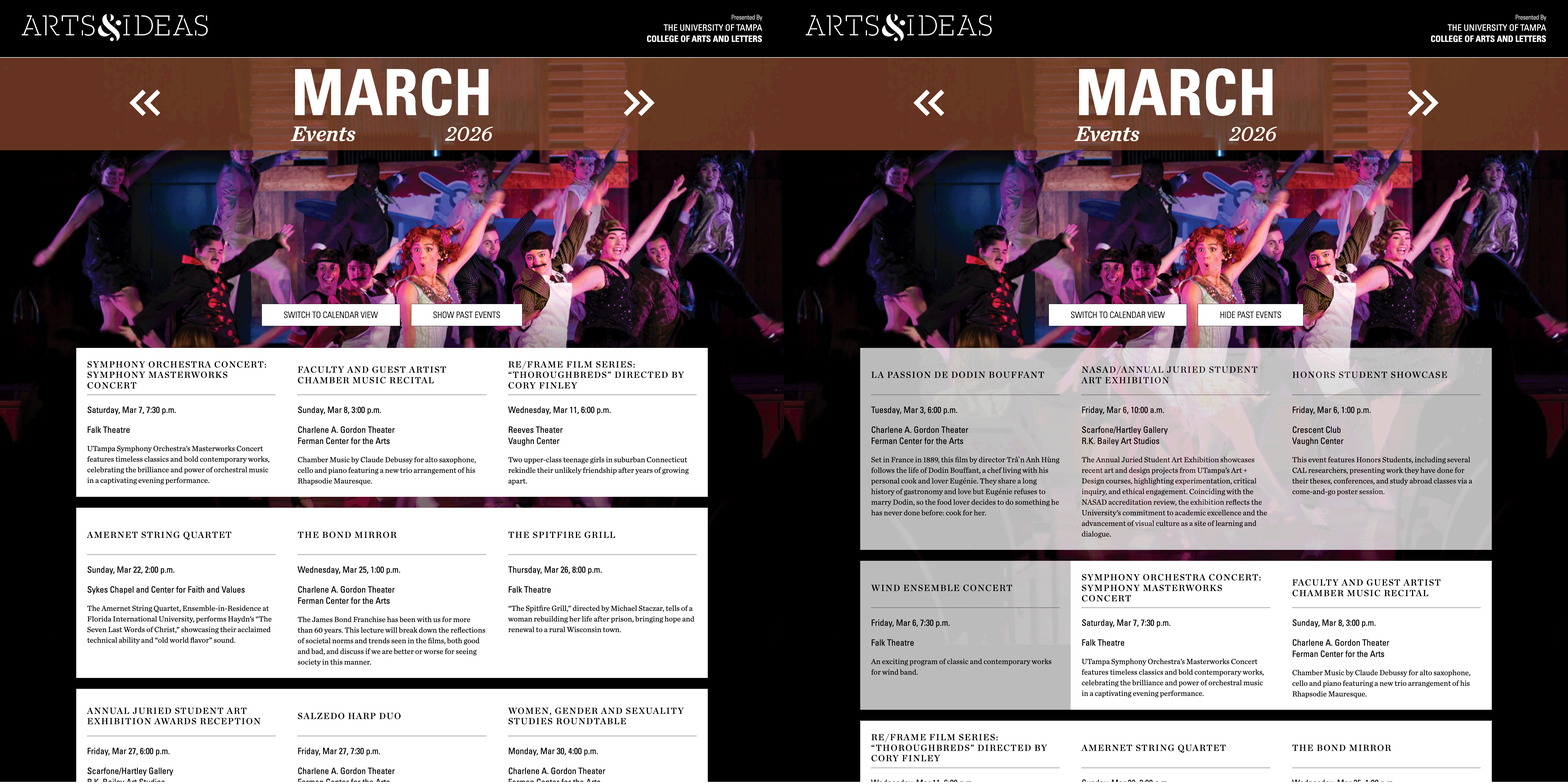
Smart Month Navigation with Event Filtering
Built intelligent month navigation that only displays months containing events, automatically skipping empty periods like summer break. Users can swipe or click through months, with the calendar dynamically loading event data for each period.
For the current month, added a "Hide Past Events" toggle that filters out events that have already occurred—particularly valuable on mobile devices where reducing scroll length improves usability. The system compares event dates against the current timestamp to determine visibility.
Technical implementation:
Date comparison for past/future filtering
Dynamic month array generation
Prevents navigation beyond available date range
Toggle state with real-time filtering
Responsive Design
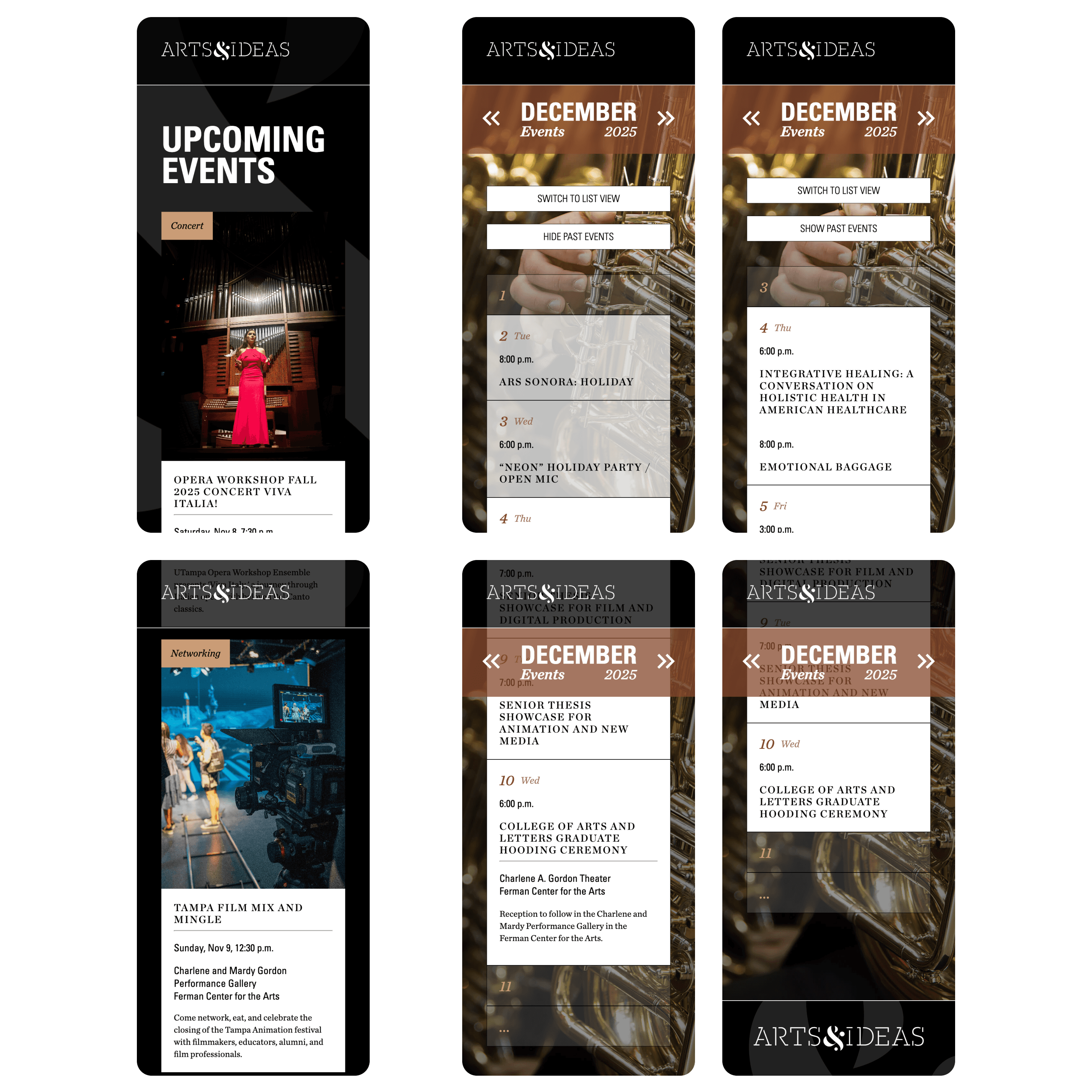
Responsive Design
Redesigned the interface for mobile devices with significantly transformed layouts optimizing for vertical scrolling and touch interaction. The calendar view shifts from a seven-column grid to a single-column layout, with each date occupying its own row for easier tapping and reading.
Mobile optimizations:
Featured event cards stack vertically with adjusted image sizing
Calendar dates expand to show full event details inline (no popover)
Days with multiple events display all events simultaneously
Empty date ranges collapse with visual indicators ("...") to minimize scrolling
Touch-optimized spacing and tap targets
The responsive approach reimagines the interface for each screen size while maintaining the publication's visual identity.
Technical Challenges & Solutions
Custom Calendar Logic Without Libraries
Challenge: Building a functional calendar from scratch requires calculating the starting day of each month, handling varying month lengths, and positioning dates correctly in a grid
Solution: Implemented JavaScript date calculations using native Date objects to determine the first day of each month and dynamically position grid items.
Bridging Print and Digital Design Systems
Challenge: The print publication uses fixed layouts, specific typography, and carefully curated imagery. Translating this to a responsive web platform while maintaining brand consistency required careful adaptation.
Solution: Extracted core design elements (color palette, typography hierarchy, spacing system) and rebuilt them as CSS variables and reusable components. Collaborated with the publication designer to ensure digital adaptations respected the original identity while embracing web-native interactions.
Mobile Calendar Transformation
Challenge: A seven-column calendar grid that works well on desktop becomes unusable on mobile screens
Solution: Designed a mobile-specific single-column layout where each date gets full width, allowing events to display complete information without popovers. Added collapsing logic for empty date ranges to prevent excessive scrolling on smaller screens.
Real-Time Content Updates
Challenge: Upcoming events needed to automatically update as events pass, without manual intervention.
Solution: Implemented date-based filtering on every page load, querying Supabase for events where event_date >= NOW() and sorted chronologically. This ensures the featured section always displays the next three upcoming events.
Future Improvements Plan
Interactive Campus Map: Visual building locator following the publication's aesthetic to help visitors navigate to event locations
Search Functionality: Full-text search across event titles and descriptions
Category Filtering: Filter events by type (exhibition, performance, lecture, workshop)
Event Reminders: Allow users to save events and receive notifications
Admin Dashboard: Content management interface for updating events without accessing the database directly